
Agent-as-Tool
Any agent can become a callable tool for other agents. A parent agent dispatches work to specialist sub-agents, each running its own model, tools, and context strategy.
How Agent-Tools Work
Section titled “How Agent-Tools Work”An agent becomes a tool when its agent_type is set to "tool". This changes the agent from something you invoke directly to something other agents (or you) invoke programmatically with structured inputs and outputs.
The core difference: a regular agent receives free-form messages. An agent-tool receives typed parameters and returns typed output.
Define the Input Schema
Section titled “Define the Input Schema”The input schema declares what parameters the agent-tool accepts. Each parameter has 4 properties:
| Property | Type | Purpose |
|---|---|---|
| name | string | Parameter identifier passed to the agent |
| type | string | number | boolean | Data type for validation |
| description | string | Explains what this parameter controls — included in the tool definition sent to the parent agent |
| required | boolean | Whether the parent agent must provide this parameter |
Example input schema for a “Research Agent” tool:
{ "parameters": [ { "name": "topic", "type": "string", "description": "The subject to research — be specific about scope and depth expected", "required": true }, { "name": "max_sources", "type": "number", "description": "Maximum number of sources to consult before synthesizing findings", "required": false }, { "name": "include_citations", "type": "boolean", "description": "Whether to include source URLs in the output", "required": false } ]}Define the Output Schema
Section titled “Define the Output Schema”The output schema declares what the agent-tool returns. This shapes the structured data the parent agent receives.
{ "output": [ { "name": "summary", "type": "string", "description": "Synthesized findings in 2-4 paragraphs" }, { "name": "source_count", "type": "number", "description": "Number of sources consulted" }, { "name": "confidence", "type": "string", "description": "Self-assessed confidence level: high, medium, or low" } ]}The agent-tool’s system prompt should instruct it to produce output matching this schema. QARK validates the return structure and surfaces mismatches in the execution trace.
Control Recursion Depth
Section titled “Control Recursion Depth”Agent-tools can call other agent-tools. A “Project Manager” dispatches a “Research Agent” which dispatches a “Web Search Agent.” This nesting is powerful — and needs a safety boundary.
Max recursion depth defaults to 3. This means:
- Depth 0: the root conversation
- Depth 1: the first agent-tool called
- Depth 2: a sub-agent called by the depth-1 agent
- Depth 3: maximum — calls beyond this depth are rejected
Set the recursion depth per agent-tool in the editor. Lower it to 1 for leaf-node agents that should never delegate. Raise it (with caution) for orchestration patterns that require deeper nesting.
Set Availability Mode
Section titled “Set Availability Mode”Each agent-tool has an availability mode that controls where it appears:
| Mode | Behavior |
|---|---|
| agents_only | The tool is visible only to other agents. It does not appear in the @mention selector or manual tool picker. Use this for specialist sub-agents that should not be invoked directly. |
| everywhere | The tool appears in the @mention selector and is available to other agents. Use this for agent-tools that are useful both as standalone agents and as sub-agents. |
Track Nested Execution
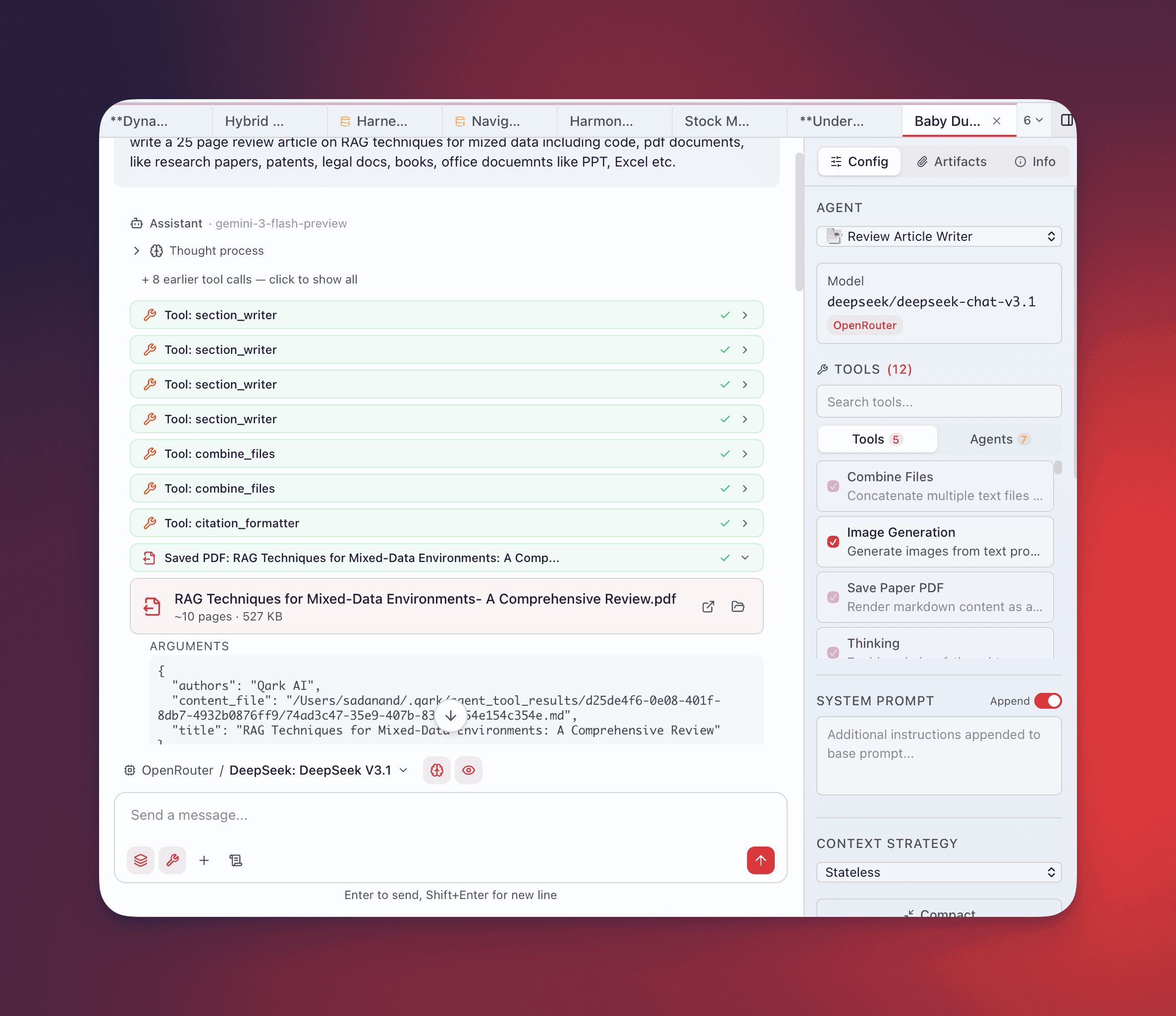
Section titled “Track Nested Execution”When an agent-tool runs, QARK creates an AgentToolActivity record with full execution visibility:
| Field | Content |
|---|---|
| agentName | The name of the agent-tool being executed |
| depth | Current nesting level (1, 2, 3…) |
| content | The messages exchanged during the agent-tool’s execution |
| subToolCalls | Any tools (including other agent-tools) invoked during execution |
| status | running, completed, or error |
| finalOutput | The structured output returned to the parent agent |
The execution trace renders in the conversation UI with depth indentation — each nesting level is visually offset so you can follow the chain from parent agent through sub-agents down to individual tool calls and back up to the final result.
Tool Turn Elevation
Section titled “Tool Turn Elevation”Standard conversations allocate a base number of tool turns per response cycle. When agent-tools are active, QARK elevates the tool turn limit to 50. This ensures that complex multi-agent workflows — where a parent agent dispatches several sub-agents, each making multiple tool calls — have sufficient headroom to complete without hitting artificial limits.
This elevation applies automatically when any agent-tool is present in the active tool set. No configuration needed.
Example: Orchestrator Pattern
Section titled “Example: Orchestrator Pattern”A “Project Manager” agent demonstrates the full agent-as-tool flow:
Project Manager (root agent)
- Model: Claude Sonnet
- Tools: Research Agent (agent-tool), Writing Agent (agent-tool), file operations
- System prompt: “You coordinate research and writing tasks. Break complex requests into research and writing phases.”
Research Agent (agent-tool, agents_only)
- Model: Claude Sonnet
- Tools: web search, URL reader
- Input:
topic(string, required),depth(string: “shallow” | “deep”, required) - Output:
findings(string),sources(number) - Max recursion depth: 1
Writing Agent (agent-tool, agents_only)
- Model: Claude Sonnet
- Tools: file write, markdown formatter
- Input:
content(string, required),format(string: “report” | “summary” | “email”, required) - Output:
document(string),word_count(number) - Max recursion depth: 1
When you ask the Project Manager to “research quantum computing advances in 2025 and write a briefing document,” the execution trace shows:
- Project Manager receives your request (depth 0)
- Project Manager calls Research Agent with
{topic: "quantum computing advances 2025", depth: "deep"}(depth 1) - Research Agent calls web search tool, reads 8 URLs, returns findings (depth 1 completes)
- Project Manager calls Writing Agent with
{content: <research findings>, format: "report"}(depth 1) - Writing Agent produces the document, returns it (depth 1 completes)
- Project Manager delivers the final briefing to you (depth 0 completes)
Every step is visible. Every tool call is logged. Every token is counted.