
Context Strategies
Why context strategy matters
Section titled “Why context strategy matters”Every LLM has a finite context window — 4K, 8K, 128K, 200K, or 1M tokens depending on the model. How you fill that window determines the quality of every response. Send too much irrelevant history and the model loses focus. Send too little and it loses continuity.
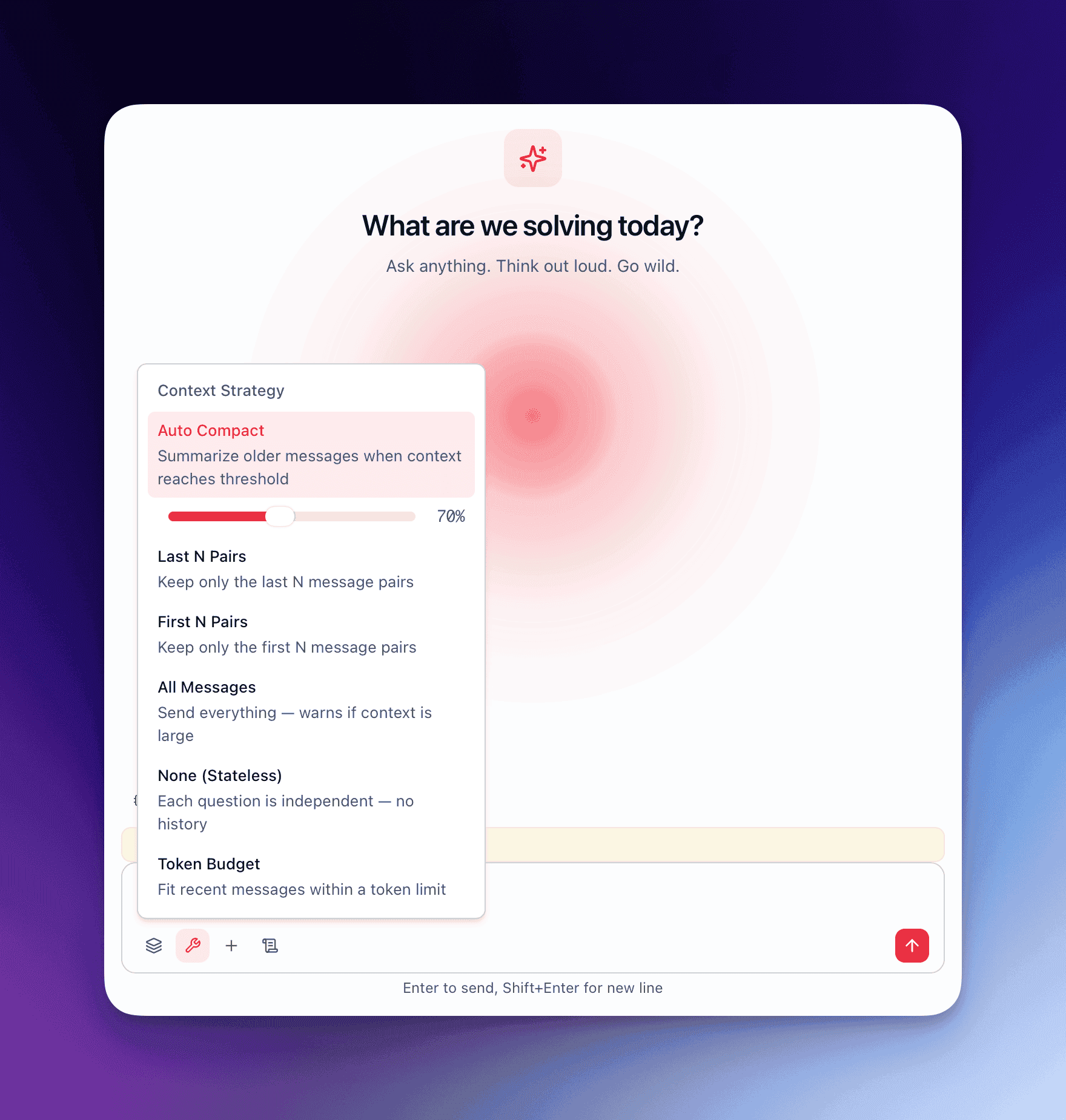
QARK lets you choose a context strategy that controls exactly which messages reach the model on every turn.
The six strategies
Section titled “The six strategies”1. auto_compact (default)
Section titled “1. auto_compact (default)”The default strategy for all conversations. It monitors token usage and compacts history when it approaches the window limit.
How it works:
- A threshold is set at 70% of the model’s context window.
- On every turn, the kernel counts the total tokens in the conversation history.
- When the count exceeds the threshold, compaction triggers automatically.
- A compaction model (configurable — can differ from the conversation model) summarizes the oldest messages into a compressed representation.
- The compaction is recursive: if the first pass still exceeds the threshold, it runs again on the next oldest batch.
- The kernel emits a
context_compactingevent, and a visual divider appears in the conversation UI marking where compaction occurred.
Content overflow sub-options:
| Option | Behavior | Tradeoff |
|---|---|---|
truncate | Drops oldest messages beyond the threshold | Fast, no extra API call, loses detail |
summarize | Compaction model summarizes oldest messages | Preserves meaning, costs an additional inference call |
The compaction model is configurable at two levels: per-conversation (in conversation settings) or globally (in Settings → Agent Defaults). A smaller, cheaper model often works well for compaction — it does not need to be the same model generating responses.
When to use it: Long-running research conversations, multi-session projects, any conversation that might exceed the context window over time.
2. last_n
Section titled “2. last_n”Retains only the last N message pairs (user + assistant). Everything older is discarded before the request reaches the model.
Example: With last_n set to 5, a conversation with 20 exchanges sends only the most recent 5 user-assistant pairs (10 messages total) plus the system prompt.
When to use it: Conversations where only recent context matters — iterating on a code snippet, refining a paragraph, troubleshooting a specific error.
3. first_n
Section titled “3. first_n”Retains only the first N message pairs. Everything after is discarded.
When to use it: Workflows where the initial instructions or context are critical and later messages are disposable. Useful when the first few messages establish a detailed specification and subsequent messages are incremental requests against that spec.
4. all
Section titled “4. all”Sends the entire conversation history on every turn. No filtering, no compaction.
When to use it: Short conversations where you are confident the total token count will stay within the model’s context window. Useful for conversations with models that have large context windows (128K+) when the conversation will remain brief.
Risk: If the conversation exceeds the model’s context window, the request will fail with a token limit error. There is no automatic fallback.
5. none
Section titled “5. none”Sends zero history. Every turn is stateless — only the system prompt and the current user message reach the model.
This is the default strategy for Sparks and Flows, where each execution is intentionally independent.
When to use it: One-off transformations, stateless utilities, Sparks, Flows, and any workflow where prior conversation context would cause interference rather than help.
6. token_budget
Section titled “6. token_budget”Sets a hard token limit on the total history sent. The kernel fills the budget starting from the most recent messages and working backward. When the budget is exhausted, older messages are excluded.
Example: With a token budget of 4000, the kernel includes messages from newest to oldest until the running token count hits 4000. The remaining older messages are excluded entirely.
When to use it: Cost control on expensive models, strict latency requirements (fewer input tokens = faster time to first token), or when you want predictable per-turn costs.
The context bar
Section titled “The context bar”Every conversation displays a context bar — a visual progress indicator showing how much of the model’s context window is currently consumed.
| Fill level | Color | Meaning |
|---|---|---|
| Below 50% | Green | Plenty of headroom |
| 50% – 80% | Yellow | Approaching the threshold |
| Above 80% | Red | Near or past the compaction threshold |
Additional context indicators:
- Context warning badges appear on the conversation tab when usage exceeds 80%.
- A Compact button in the conversation toolbar lets you trigger manual compaction at any time, regardless of the automatic threshold.
- Token counts update in real time as the model streams its response.
Choose the right strategy
Section titled “Choose the right strategy”| Scenario | Recommended strategy | Why |
|---|---|---|
| Long research session | auto_compact | Preserves continuity across dozens of turns without exceeding the window |
| Quick code iteration | last_n (3–5 pairs) | Only recent context matters; keeps requests fast and cheap |
| Specification-first workflow | first_n | Preserves the detailed spec; later back-and-forth is disposable |
| Short Q&A (under 20 turns) | all | No overhead, full fidelity |
| Spark or Flow execution | none | Stateless by design; history would cause interference |
| Strict cost budget | token_budget | Predictable input costs on every turn |
You can change the context strategy at any point during a conversation. The new strategy applies starting from the next message — it does not retroactively alter what was already sent.