
Prompts
Prompts are reusable text templates with placeholder variables. Write a template once, fill in the blanks each time you use it, and the rendered text inserts into the composer. Prompts are templates, not execution pipelines — for automated workflows with output actions, see Flows.
Prompt Anatomy
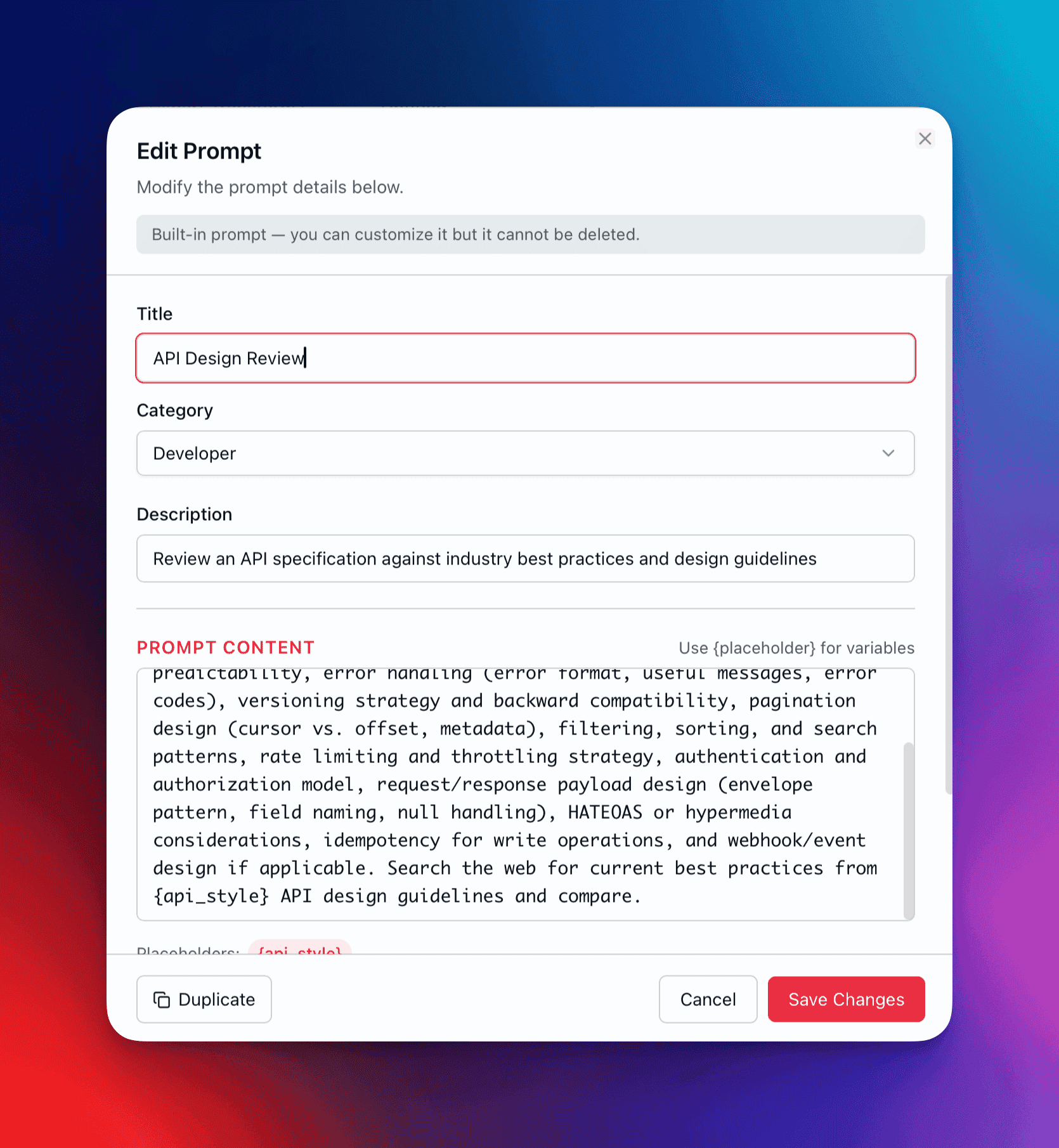
Section titled “Prompt Anatomy”Every prompt consists of these fields:
| Field | Required | Description |
|---|---|---|
| Title | Yes | Display name shown in the library and picker |
| Description | No | Short explanation of what the prompt does and when to use it |
| Content | Yes | The template text, including any {placeholder} variables |
| Category | Yes | Organizational grouping (select from built-in or custom categories) |
| Tags | No | Freeform labels for filtering and search |
| Favorite | No | Flag to pin the prompt to the Favorites section |
Placeholder Variables
Section titled “Placeholder Variables”Insert dynamic values into your templates using the {variable_name} syntax:
Analyze the {document_type} titled "{title}" and provide:1. A {length}-sentence summary2. Key findings related to {focus_area}3. Recommended next steps for {audience}QARK auto-detects every {variable_name} token in your prompt content. When you select the prompt for use, a fill-in dialog appears with a labeled input field for each detected placeholder.
Placeholder rules:
- Names support letters, numbers, and underscores:
{my_var_2}works. - Duplicate names map to a single input field — use
{name}twice in your template, fill it in once. - Leave a placeholder field empty to remove that token from the final text.
Categories
Section titled “Categories”Prompts are organized into categories. QARK ships with these built-in categories:
| Category | Category | Category |
|---|---|---|
| Writing | Analysis | Code |
| Business Planning | Marketing | Web Dev |
| Automations | Learning | Data Science |
| Education | Image Gen | Custom |
Create your own categories when the built-ins don’t fit. Custom categories appear alongside the defaults in the library sidebar and follow the same sorting and filtering behavior.
Browse the Prompt Library
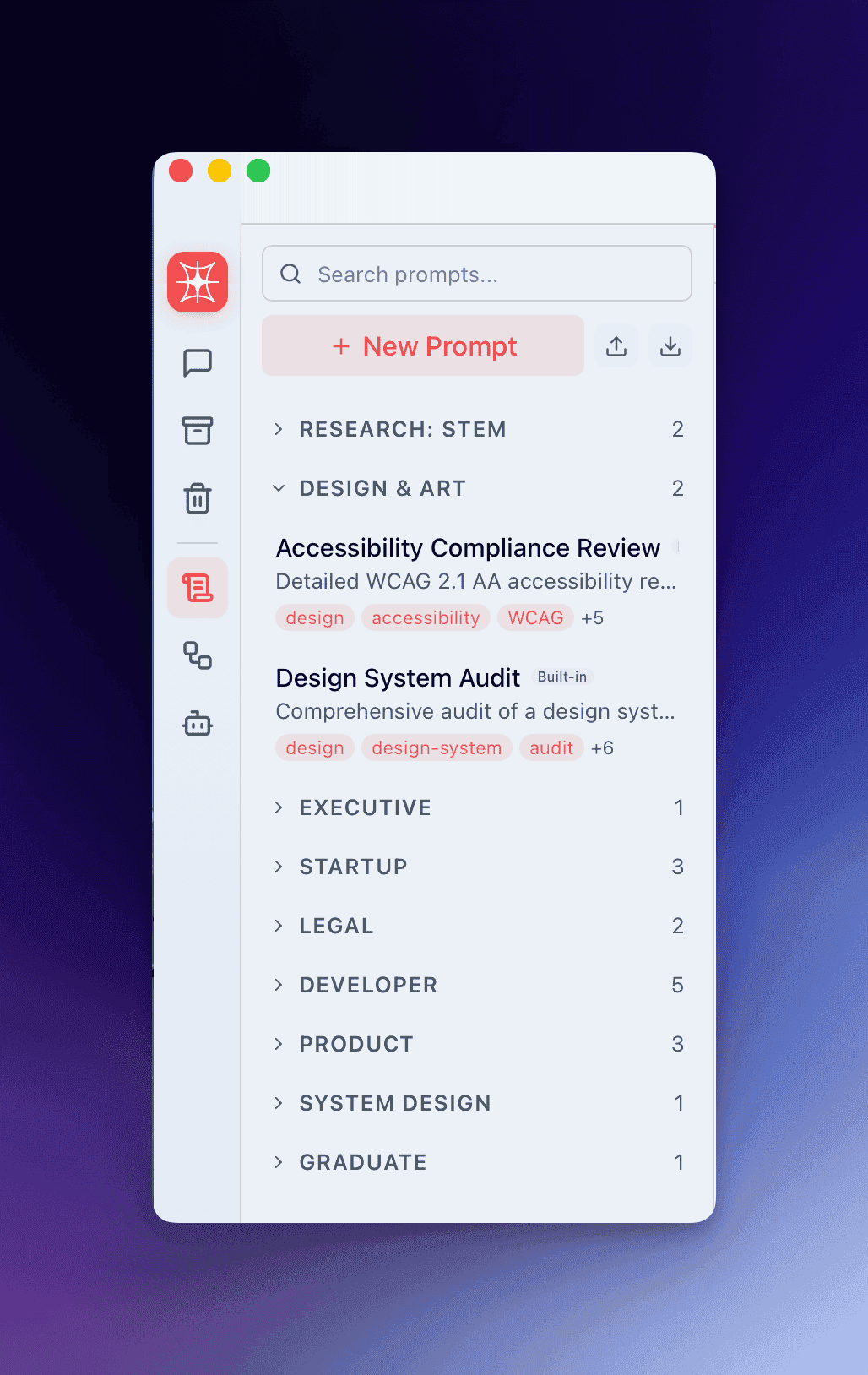
Section titled “Browse the Prompt Library”The Prompt Library lives in the sidebar and provides fast access to your full collection:
Favorites Section
Section titled “Favorites Section”Prompts flagged as favorites appear at the top of the library in a dedicated section, regardless of category. Use this for your 5–10 most-used templates.
Category Groups
Section titled “Category Groups”Below favorites, prompts are organized by category in collapsible groups. Each group header displays the category name and a count badge showing how many prompts it contains.
Search
Section titled “Search”The search field at the top of the library filters across 4 fields simultaneously:
- Title
- Description
- Content (the full template text)
- Tags
Results update as you type. Matching prompts surface regardless of category.
Context Menu
Section titled “Context Menu”Right-click (or long-press) any prompt to access:
| Action | Description |
|---|---|
| Edit | Open the prompt in the editor |
| Duplicate | Create a copy with “(Copy)” appended to the title |
| Toggle Favorite | Add or remove from the Favorites section |
| Delete | Remove the prompt permanently |
Use a Prompt in Conversation
Section titled “Use a Prompt in Conversation”- Click the prompt picker button in the composer toolbar (or use the keyboard shortcut).
- Browse by category or type to search.
- Select a prompt.
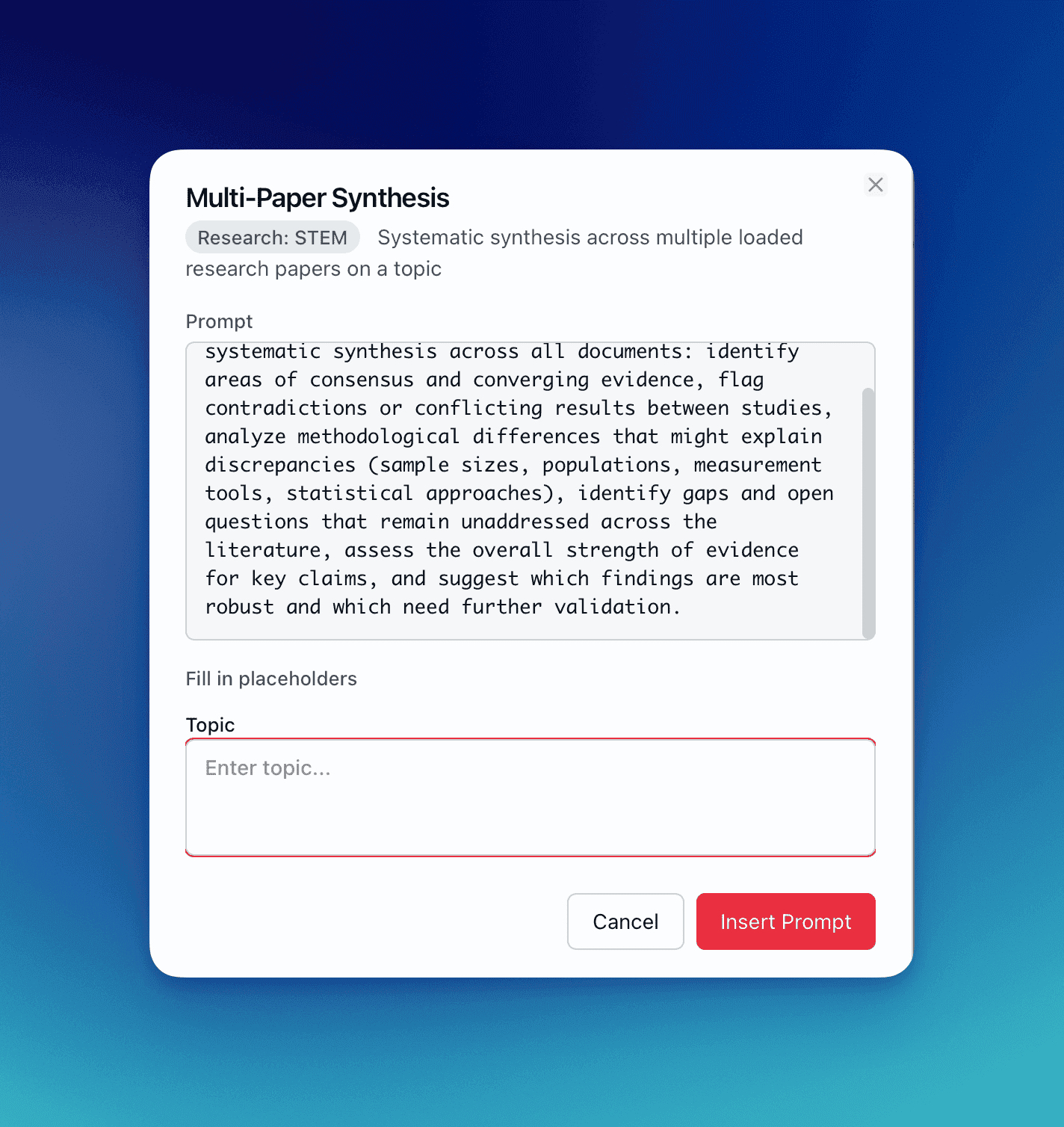
- If the prompt contains placeholders, the fill-in dialog appears with a labeled field for each variable.
- Fill in the values and confirm.
- The fully rendered prompt text inserts into the composer, ready to send.
You remain in control — the text lands in the composer, not sent automatically. Review, edit, or append additional context before sending.
Built-In Prompts
Section titled “Built-In Prompts”QARK ships with built-in prompts across several categories. These are compiled into the app binary and seeded into your database on first launch. Built-in prompts have these characteristics:
- Read-only — You cannot edit the original.
- Always available — They persist across updates and cannot be deleted.
- Restorable — If you’ve modified your prompt library and want to restore the built-ins, use the reset option in settings.
- Duplicatable — Click Duplicate from the context menu to create an editable copy you can customize.
Many built-in prompts are designed to work with attached documents (research papers, strategy docs, codebases) and web search. Placeholders like {field}, {market}, or {technology_stack} let you tailor each prompt to the task at hand.
Research: STEM
Section titled “Research: STEM”| Prompt | Description |
|---|---|
| Deep-Dive Paper Analysis | Comprehensive analysis of a loaded research paper — methodology, statistics, experimental design, limitations, and follow-up experiments for {field} |
| Multi-Paper Synthesis | Systematic synthesis across multiple loaded papers on {topic} — consensus, contradictions, methodological differences, evidence strength |
Design & Art
Section titled “Design & Art”| Prompt | Description |
|---|---|
| Design System Audit | Audit a loaded design system for consistency, WCAG 2.1 AA accessibility, missing component states, and responsive behavior gaps |
| Accessibility Compliance Review | Detailed WCAG 2.1 AA review — contrast ratios, keyboard navigation, screen reader considerations, touch targets, with prioritized remediation steps |
Executive
Section titled “Executive”| Prompt | Description |
|---|---|
| Strategy Document Review | Executive-level evaluation of a strategy document — vision clarity, resource allocation, risk assessment, KPI framework, competitive positioning |
Startup
Section titled “Startup”| Prompt | Description |
|---|---|
| Market Research Deep Dive | Comprehensive market research brief for {market} — TAM/SAM/SOM, growth projections, key players, funding activity, regulatory landscape (uses web search) |
| Competitor Teardown | Full teardown of {competitor} from web sources — product features, pricing, funding history, customer reviews, tech stack signals, growth indicators |
| Go-to-Market Plan | Build a GTM plan for {market} — ICP, channel strategy with CAC estimates, launch sequence, messaging framework, 90-day execution plan (uses web search) |
| Prompt | Description |
|---|---|
| Contract Deep Review | Clause-by-clause contract analysis — plain-English summaries, risk assessment, aggressive terms, missing protections, negotiation points |
| Legal Risk Assessment | Structured risk assessment of {proposed_action} — regulatory, contractual, IP, employment, privacy, and cross-border risks rated low/medium/high (uses web search) |
Developer
Section titled “Developer”| Prompt | Description |
|---|---|
| Codebase Architecture Review | Architecture analysis for {framework_or_stack} — design patterns, scalability bottlenecks, coupling, testing strategy, security, observability (uses web search) |
| Security Audit Checklist | OWASP Top 10-aligned security checklist — authentication, input validation, encryption, API security, dependency vulnerabilities, compliance (uses web search) |
| Performance Optimization Plan | Prioritized optimization plan for {technology_stack} — quick wins, medium-term improvements, architectural changes, monitoring setup (uses web search) |
| Technical Debt Assessment | Systematic technical debt inventory — code-level, architecture-level, infrastructure, testing, and documentation debt with remediation priorities |
| API Design Review | Review an API spec against {api_style} best practices — RESTful conventions, error handling, pagination, versioning, rate limiting, idempotency (uses web search) |
Product
Section titled “Product”| Prompt | Description |
|---|---|
| User Research Synthesis | Synthesize loaded research data (interviews, surveys, analytics) into segments, pain point hierarchy, behavioral patterns, and opportunity areas |
| Product Strategy Review | Critical PM assessment of a product strategy — target user clarity, positioning strength, competitive moat, metrics framework, roadmap alignment for {industry} (uses web search) |
| Feature Specification Writer | Detailed feature spec for {feature} — user stories, acceptance criteria (given/when/then), edge cases, error states, analytics events, rollout plan |
System Design
Section titled “System Design”| Prompt | Description |
|---|---|
| Architecture Decision Record | Comprehensive ADR for {technical_choice} — decision drivers, options analysis (3+), pros/cons, consequences, real-world case studies (uses web search) |
Graduate
Section titled “Graduate”| Prompt | Description |
|---|---|
| Literature Review Builder | Thematic literature review for {topic} ({degree_type} thesis) — synthesizes loaded papers, maps debates, identifies gaps, searches for recent publications (uses web search) |
Additional Prompt Packs
Section titled “Additional Prompt Packs”Beyond the built-in prompts, QARK provides an additional collection of prompts covering specialized domains. Download the extra prompts file and import it into QARK to add prompts across these categories:
| Category | Prompts | Examples |
|---|---|---|
| Research: STEM | 4 | Research Question Refinement, Methods Section Writer, Grant Narrative Builder, Reproducibility Checker |
| Research: Humanities | 6 | Primary Source Analysis, Theoretical Framework Application, Comparative Textual Analysis, Dissertation Argument Mapper |
| Design & Art | 4 | Competitive Design Analysis, Portfolio Case Study Writer, Design Trend Research, Client Presentation Script |
| Executive | 5 | Market Intelligence Briefing, Board Meeting Preparation, Crisis Communication Plan, Annual Planning Framework |
| Startup | 3 | Fundraising Strategy, User Interview Script, Technical Co-Founder Pitch |
| Legal | 4 | Regulatory Research, Case Law Research Assistant, Terms of Service Drafter, Due Diligence Document Request |
| Patents | 6 | Prior Art Search Strategy, Patentability Assessment, Patent Landscape Analysis, Claim Chart Preparation |
| Developer | 1 | Migration Planning |
| Product | 3 | Stakeholder Alignment Document, Product Launch Playbook, Churn Analysis Framework |
| System Design | 5 | Capacity Planning, Disaster Recovery Plan, System Observability Design, Technology Evaluation, Load Testing Strategy |
| Soil Science | 6 | Site Assessment Report, Crop-Specific Soil Management, Soil Carbon Sequestration Plan, Precision Agriculture Soil Mapping |
| Sustainability | 6 | ESG Materiality Assessment, Net Zero Roadmap, Supply Chain Sustainability Assessment, Circular Economy Business Case |
| Graduate | 5 | Methodology Design Assistant, Academic Writing Coach, Funding Opportunity Finder, Teaching Portfolio Builder |
To install: download the JSON file from the QARK GitHub releases page, then import it via the prompt library’s import function.
Download Extra Prompts from GitHub →Import and Export
Section titled “Import and Export”Export
Section titled “Export”Select one or more prompts from the library and choose Export Selected. QARK saves them as a .json file containing the full prompt data: title, description, content, category, tags, and favorite status.
Import
Section titled “Import”Import a .json prompt file through Settings → Prompts → Import or drag the file onto the prompt library. QARK handles deduplication automatically:
- If an imported prompt title matches an existing prompt, you’re prompted to skip, rename, or overwrite.
- Category mappings are preserved. If an imported prompt references a category that doesn’t exist locally, the category is created.
Batch Operations
Section titled “Batch Operations”From the prompt library, enter selection mode to perform bulk actions:
| Action | Description |
|---|---|
| Export Selected | Download selected prompts as a JSON file |
| Delete Selected | Remove all selected prompts (confirmation required) |