
RAG Pipeline
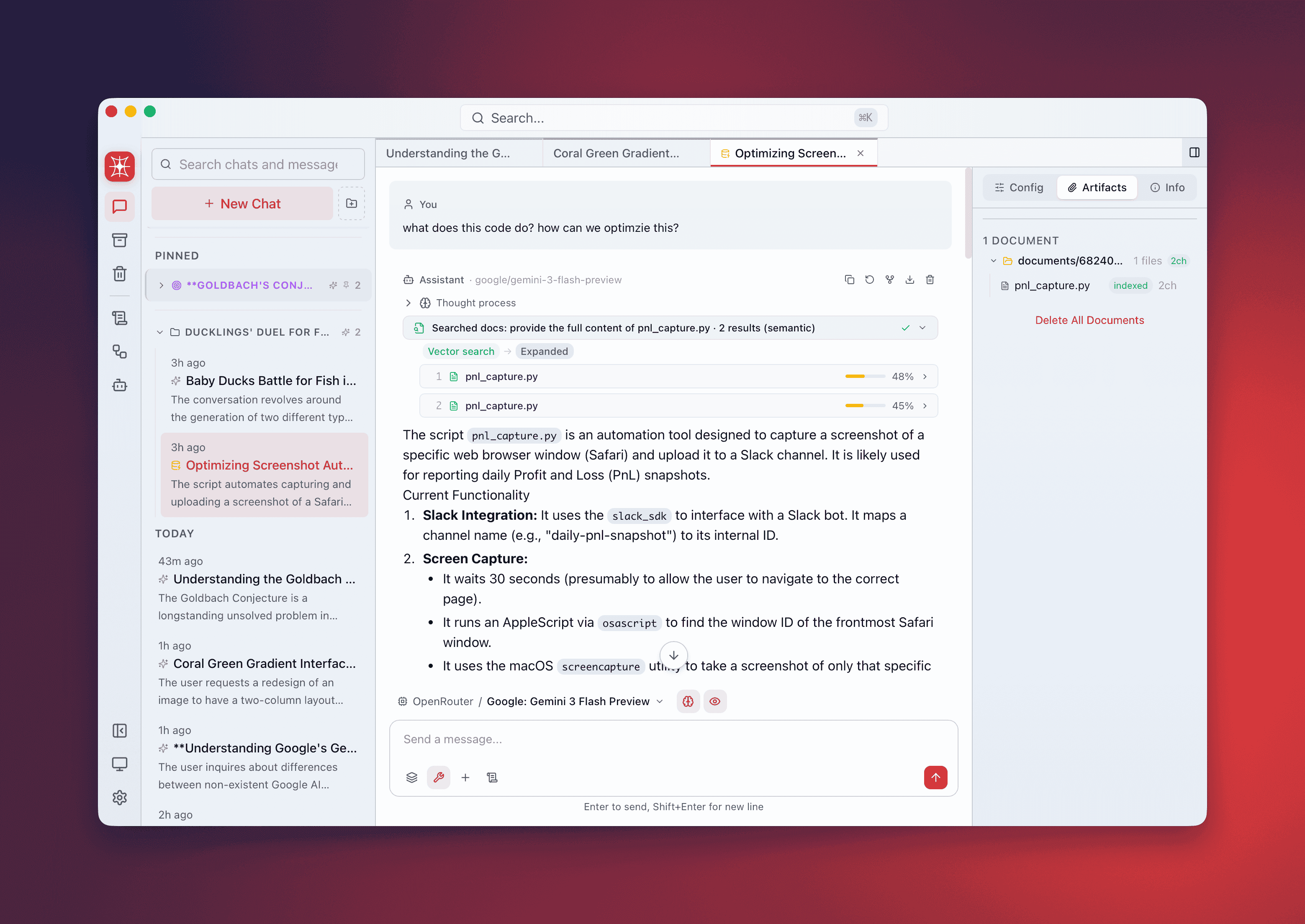
QARK’s RAG (Retrieval-Augmented Generation) pipeline turns your documents into a searchable knowledge base. Drag in files, they get parsed, chunked, and embedded into a local vector index. Ask questions with @document-search and get answers with inline citations pointing to exact sources, pages, and relevance scores.
Everything processes locally through your configured providers. No cloud upload.
Smart routing
Section titled “Smart routing”Not every document needs a full vector pipeline. QARK routes based on size:
| Document size | Route | What happens |
|---|---|---|
| Below threshold | Direct injection | Full text inserted into the prompt context. No chunking, no embedding. Status: direct |
| Above threshold | Full RAG pipeline | Parsed → chunked → embedded → indexed → searched at query time |
The threshold is a percentage of the model’s context window (default: 30%). A 200-page PDF always goes through RAG. A 2-paragraph markdown file gets injected directly.
Configure in per-conversation RAG settings or globally in Settings → RAG → Direct Injection Threshold.
Supported file types
Section titled “Supported file types”| Format | Extensions | Notes |
|---|---|---|
.pdf | Text extraction + optional image extraction | |
| Word | .docx | Preserves heading structure |
| Excel | .xlsx | Sheet-aware parsing |
| PowerPoint | .pptx | Slide-by-slide extraction |
| Markdown | .md, .mdx | Heading-based chunking |
| HTML | .html, .htm | Tag-aware parsing |
| Plain text | .txt, .log, .csv | Line-based chunking |
| EPUB | .epub | Chapter-aware extraction |
Add documents
Section titled “Add documents”Three methods:
- Drag and drop — drag files or folders onto the conversation. Multiple files accepted simultaneously.
- File picker — click the attachment button in the composer.
- Recursive folder scanning — drop a folder. QARK scans recursively, preserving directory structure in the document panel.
Processing pipeline
Section titled “Processing pipeline”Each document progresses through visible stages. The document panel shows real-time status per file:
| Stage | Description |
|---|---|
pending | Queued for processing |
parsing | Extracting text from the file format |
chunking | Splitting into semantically meaningful segments |
embedding | Generating vector embeddings for each chunk |
indexing | Storing vectors in the local search index |
searching | Being queried (visible during response generation) |
ready | Indexed and available for retrieval |
error | Processing failed — hover for details |
skipped | Unsupported file type or empty file |
direct | Small enough for direct injection — no RAG processing |
Search strategies
Section titled “Search strategies”QARK selects a retrieval strategy per query. Four are available:
Semantic search
Section titled “Semantic search”Standard vector similarity. Your query is embedded and compared against chunk vectors using cosine similarity. Best when your query language closely matches the document language.
HyDE (Hypothetical Document Embedding)
Section titled “HyDE (Hypothetical Document Embedding)”Generates a hypothetical answer first, embeds that, then searches for similar chunks. Closes the vocabulary gap — your query “What’s the refund policy?” matches chunks describing the policy without using the word “refund.”
Step-back prompting
Section titled “Step-back prompting”Generates a broader, more abstract version of your query, then searches with both original and abstracted queries. “Why did Q3 revenue drop in EMEA?” becomes “What factors influenced EMEA regional revenue trends?”
Auto (default)
Section titled “Auto (default)”QARK analyzes the query and picks the best strategy automatically. The selected strategy appears in the response metadata.
Code-aware chunking
Section titled “Code-aware chunking”For source code files, QARK uses syntax-aware chunking:
- Functions, methods, and classes kept as whole units
- Code blocks in Markdown never split mid-block
- Import statements and module headers stay attached to the first chunk
Retrieved code chunks are syntactically complete, not arbitrary text fragments cut at a character limit.
Cross-encoder reranking
Section titled “Cross-encoder reranking”Reranking is optional but improves retrieval accuracy. The process:
- Over-fetch — vector search retrieves 3x the final chunk count as candidates
- Re-score — a cross-encoder reranking model (Voyage AI or Jina AI) scores each candidate against the query with full attention
- Select — top-scoring chunks after reranking become the final context
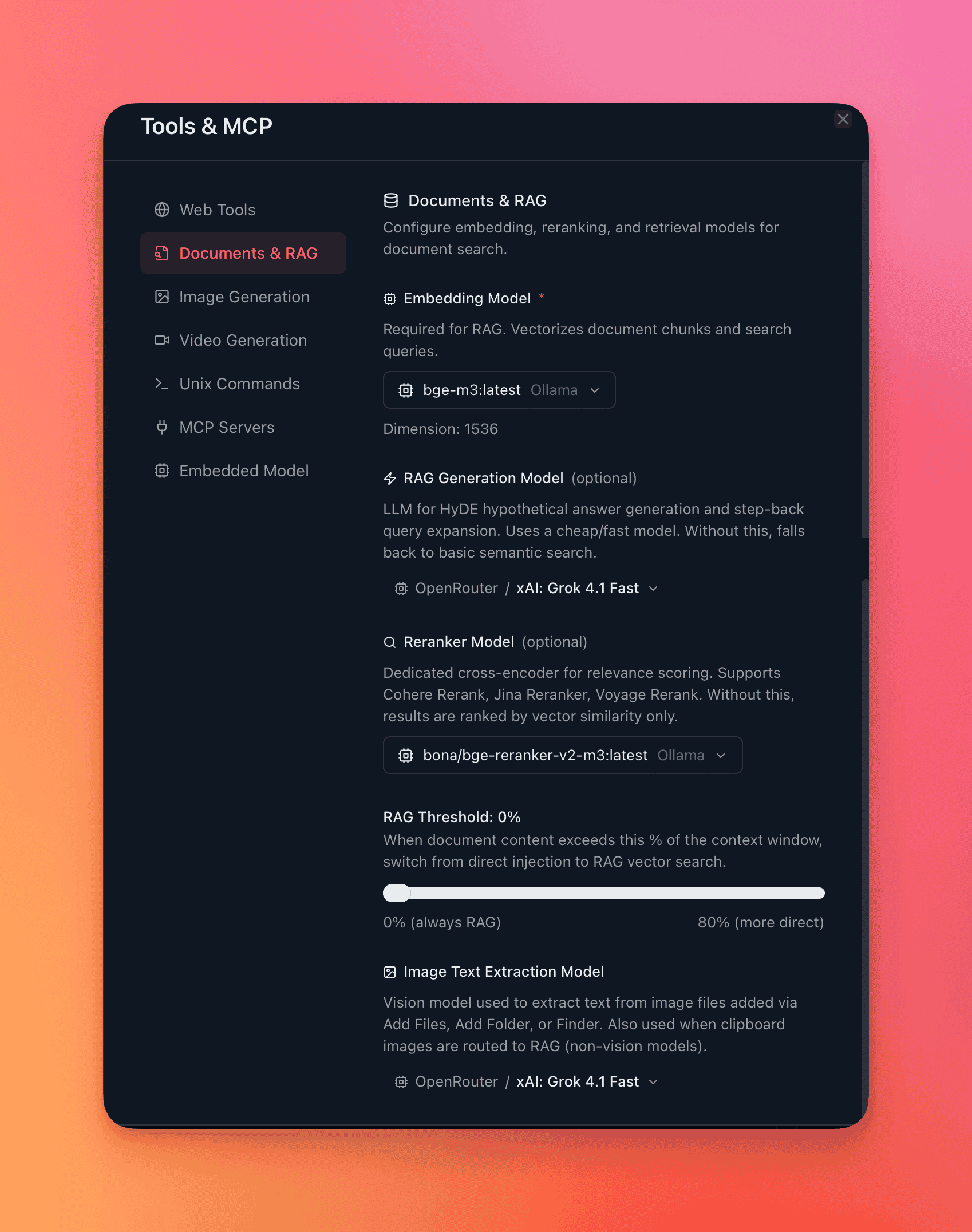
Configure the reranker in per-conversation RAG settings or globally. See Embedding & Reranking for available models.
Parent-chunk expansion
Section titled “Parent-chunk expansion”Retrieved chunks rarely exist in isolation. QARK fetches ±1 adjacent chunks from the same document, providing surrounding context. If chunk #14 scores highest, the model also sees chunks #13 and #15.
Citations
Section titled “Citations”Every claim from your documents includes an inline citation badge (e.g., [1], [2], [3]).
| Field | Content |
|---|---|
| Source document | Original file name |
| Page number | For paginated formats (PDF, DOCX, PPTX) |
| Section | Heading or chapter title when available |
| Chunk ID | Internal reference to the exact chunk |
| Relevance score | Similarity/reranking score (0–1) |
Hover a badge for full citation details. Click to scroll to the referenced chunk in the document panel.
PDF image extraction
Section titled “PDF image extraction”For PDFs with diagrams, charts, or embedded images:
- Enable in per-conversation RAG settings under Image Extraction
- Configure which vision-capable model handles image description
- Extracted images are converted to text descriptions and indexed as additional chunks
- Useful for technical manuals, slide decks, and research papers with figures
Per-conversation RAG configuration
Section titled “Per-conversation RAG configuration”Each conversation maintains independent RAG settings:
| Setting | Options |
|---|---|
| Embedding provider & model | Any configured provider with embedding models |
| RAG generation model | Model for HyDE/step-back query generation |
| Reranker provider & model | Voyage AI or Jina AI reranking models |
| Direct injection threshold | 1%–100% of context window (default: 30%) |
| Search strategy | Semantic, HyDE, Step-back, Auto |
| Image extraction model | Any vision-capable model |
Access from the Info Panel → Config tab or the RAG config section in the conversation sidebar.
End-to-end workflow
Section titled “End-to-end workflow”- Drag 5 research papers onto the conversation.
- Watch each file progress through parsing → chunking → embedding → indexing → ready.
- Ask: “What are the main differences in methodology between papers 2 and 4?”
- Receive a structured comparison with inline citation badges linking to specific pages and sections.
- Hover any citation to verify. Click to jump to the exact chunk.