
Embedding & Reranking
When you attach documents to a conversation and use @document-search, QARK runs a RAG (Retrieval-Augmented Generation) pipeline behind the scenes. Two specialized model types make this work: embedding models convert your documents into searchable vectors, and reranking models re-score results for higher accuracy.
You don’t need to understand the internals to use document search — attach files, ask questions, get cited answers. But if you want to tune retrieval quality, this page covers the providers and models available.
How it works in practice
Section titled “How it works in practice”- Attach documents — drag files into a conversation or use the Artifacts tab. Supported: PDF, DOCX, XLSX, PPTX, Markdown, HTML, TXT, EPUB, source code.
- QARK indexes automatically — documents are chunked, embedded, and stored in a local vector database. You see a progress indicator.
- Ask questions with
@document-search— QARK converts your query into a vector, finds the most relevant chunks, optionally reranks them, and passes them to the chat model as context. - Get cited answers — responses include inline citations with source document, page number, and relevance score.
QARK picks search strategies automatically — semantic search, HyDE (hypothetical document embeddings), or step-back queries — depending on the question type. You can override this per conversation in the Info panel.
Embedding providers
Section titled “Embedding providers” Voyage AI
Section titled “ Voyage AI”API key: dash.voyageai.com → API Keys
Base URL: https://api.voyageai.com/v1
| Model | Dimensions | Max tokens | Use case |
|---|---|---|---|
| voyage-3 | 1024 | 32K | Flagship, best overall quality |
| voyage-3-lite | 512 | 32K | Cost-efficient, strong retrieval |
| voyage-code-3 | 1024 | 32K | Code and technical docs |
| voyage-finance-2 | 1024 | 32K | Financial documents, SEC filings |
| voyage-multilingual-2 | 1024 | 32K | 30+ languages, cross-lingual search |
| voyage-large-2 | 1536 | 16K | High-dimensional legacy model |
Voyage AI consistently ranks at the top of retrieval benchmarks (MTEB). The same API key works for both embedding and reranking.
 Jina AI
Section titled “ Jina AI”API key: jina.ai → Dashboard
Base URL: https://api.jina.ai/v1
| Model | Dimensions | Max tokens | Use case |
|---|---|---|---|
| jina-embeddings-v3 | 1024 | 8K | Multilingual (89+ languages), Matryoshka dims |
| jina-clip-v2 | 1024 | 8K | Multimodal — text + image in same embedding space |
| jina-embeddings-v2-base-en | 768 | 8K | English-only, cost-effective |
Jina CLIP v2 is notable — it embeds both text and images into a shared vector space, enabling cross-modal retrieval. The same API key works for both embedding and reranking.
Additional embedding providers
Section titled “Additional embedding providers”These providers offer embedding models through their existing QARK integrations — no separate API key needed if you already have the provider connected.
| Provider | Notable models | Pricing |
|---|---|---|
 OpenAI OpenAI | text-embedding-3-large (3072d), text-embedding-3-small (1536d) | $0.02–0.13/M |
 Gemini Gemini | gemini-embedding-001 (3072d, 40+ languages), gemini-embedding-2-preview (3072d, multimodal — text, images, video, audio, PDFs) | Free tier / $0.15–0.20/M |
 Together Together | BGE Large EN v1.5 (1024d), Multilingual E5 Large (1024d, 100+ languages) | $0.008/M |
 OpenRouter OpenRouter | 20+ models — OpenAI, Mistral Codestral Embed, Qwen3 Embedding (4096d), NVIDIA Nemotron VL, Sentence Transformers, and more | $0.01–0.15/M |
 Ollama Ollama | nomic-embed-text, mxbai-embed-large, snowflake-arctic-embed — pull any embedding model locally | Free (local) |
 LM Studio LM Studio | Any GGUF embedding model loaded in the local server | Free (local) |
Gemini embedding models have a free tier (rate-limited to 1,500 requests/day) and support 3072 dimensions. On the paid tier, pricing is $0.15/M tokens for embedding-001 and $0.20/M for the multimodal embedding-2-preview. The preview model embeds images, video, audio, and PDFs directly — not just text.
Reranking providers
Section titled “Reranking providers”Reranking is optional but significantly improves retrieval accuracy. QARK over-fetches 3x the candidates from vector search, then uses a cross-encoder reranker to re-score and keep only the most relevant chunks.
Voyage AI
Section titled “ Voyage AI”| Model | Max tokens | Use case |
|---|---|---|
| rerank-2 | 8K | Highest accuracy reranking |
| rerank-2-lite | 8K | Cost-efficient, strong quality |
Jina AI
Section titled “ Jina AI”| Model | Max tokens | Use case |
|---|---|---|
| jina-reranker-v2-base-multilingual | 1K | Multilingual (100+ languages) |
| jina-reranker-v1-base-en | 512 | English-only, fast |
Reranking uses the same API key as the corresponding embedding provider — no additional setup if you already have Voyage AI or Jina connected.
Local reranking (Ollama / LM Studio)
Section titled “ Local reranking (Ollama / LM Studio)”You can run reranking models locally through Ollama or LM Studio — zero cost, no API key, data stays on your machine. QARK doesn’t auto-detect local reranking models, so you need to select one manually in the RAG settings.
With Ollama, pull a reranking-capable model:
ollama pull bge-reranker-v2-m3Other options: bge-reranker-large, jina-reranker-v2-base-multilingual (if available in the Ollama library).
With LM Studio, load any GGUF reranking model into the local server.
Once running, select the model in Settings → Tools & MCP → RAG → Reranker. Local rerankers are slower than cloud alternatives but free and fully private.
If you don’t need local reranking, you can skip it entirely — vector search without reranking still produces good results. Or use Voyage AI / Jina AI free tiers for cloud reranking at minimal cost.
Configure the RAG pipeline
Section titled “Configure the RAG pipeline”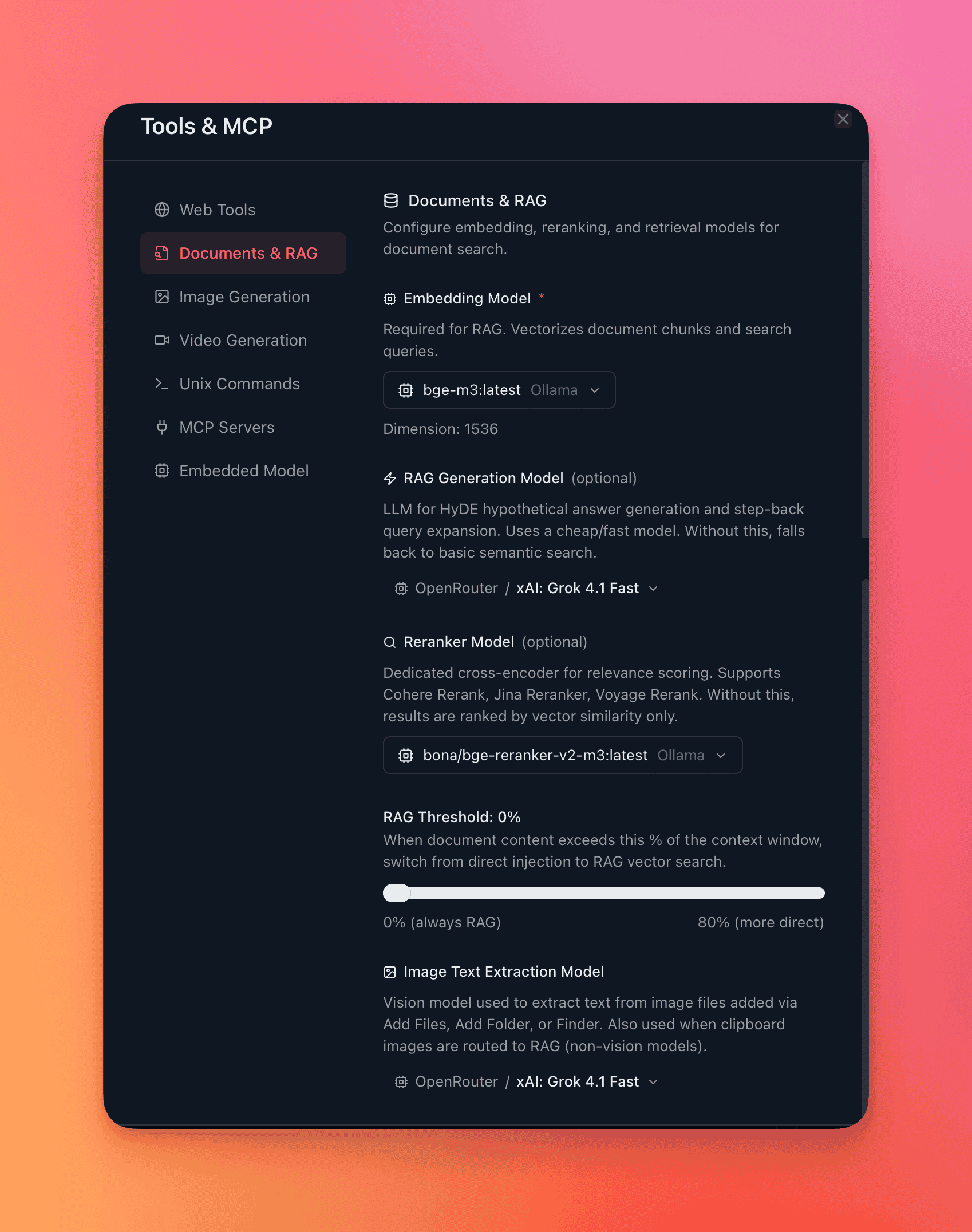
- Open Settings → Tools & MCP → RAG.
- Select an embedding provider and model.
- Optionally enable reranking and select a reranker model.
- Save. New documents use the selected models. Existing documents need re-indexing if you change the embedding model (QARK prompts you).
You can also override RAG settings per conversation in the Info panel → Config tab — different embedding model, different reranker, different threshold.
Choosing models
Section titled “Choosing models”| Priority | Embedding | Reranking |
|---|---|---|
| Best accuracy | Voyage voyage-3 or OpenAI text-embedding-3-large | Voyage rerank-2 |
| Lowest cost | Gemini embedding (free tier) or Voyage voyage-3-lite | Voyage rerank-2-lite |
| Multilingual | Jina embeddings-v3 or Voyage multilingual-2 | Jina reranker-v2-multilingual |
| Code / technical docs | Voyage voyage-code-3 | Any reranker |
| Multimodal (images + text) | Gemini embedding-2-preview or Jina CLIP v2 | Any reranker |
| Offline / air-gapped | Ollama with nomic-embed-text | Not available locally |
Changing embedding models
Section titled “Changing embedding models”Different models produce vectors in different dimensional spaces — they’re not interchangeable. If you switch embedding models after indexing documents, QARK prompts you to re-index. Re-indexing processes all documents through the new model and replaces the stored vectors.