
Switching Models
Every conversation in QARK can use a different model. Switch mid-thread, compare outputs side by side, and use different tiers for different tasks.
Per-conversation overrides
Section titled “Per-conversation overrides”Your global default model (set in Settings → Providers → Model Defaults) applies to every new conversation. Any conversation can override it:
- Open the model picker from the conversation toolbar.
- Select a different model.
- The new model picks up with the full context intact.
The override applies only to that conversation. All others continue using the global default.
Context carries over
Section titled “Context carries over”When you switch models mid-conversation, QARK sends the entire message history to the new model. A 40-message thread on Claude Opus 4.6 can switch to GPT-5.4 for message 41 — the new model sees everything.
This applies across providers too. Start on Anthropic, switch to Gemini, switch to a local Ollama model — all with the same conversation context.
Compare models in split view
Section titled “Compare models in split view”Open two conversations side by side with different models to compare outputs directly.
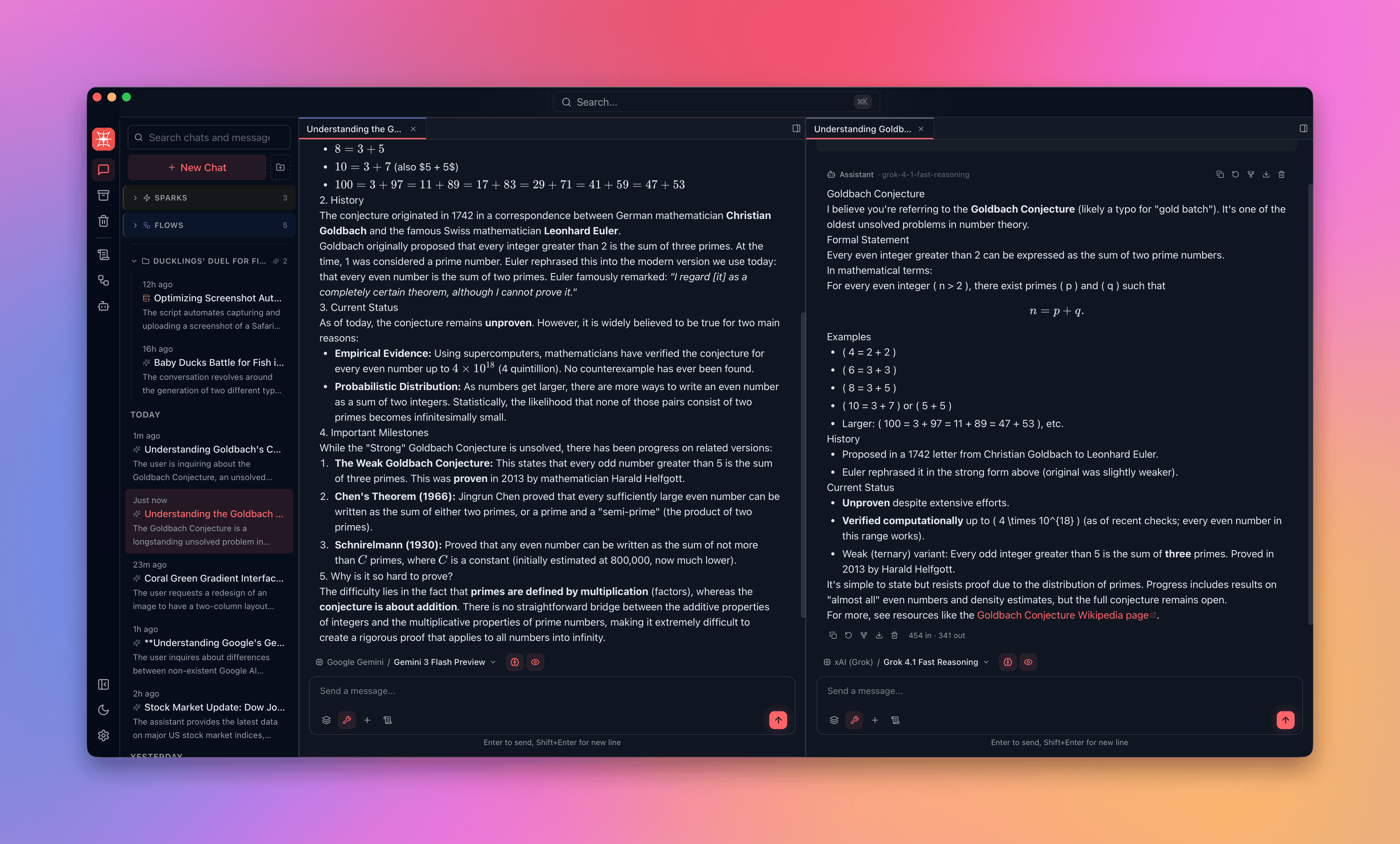
Each tab displays the provider’s accent color on its top border — Anthropic is violet, OpenAI is green, Gemini is blue, xAI is gray — so you can identify which model produced which output at a glance.
Split view is useful for:
- Evaluating a new model against your current default before switching.
- Testing whether a cheaper model produces acceptable quality for a specific task.
- Comparing reasoning depth, tone, or factual accuracy across providers.
Model strategies by task
Section titled “Model strategies by task”Different tasks have different quality and cost requirements. A deliberate model strategy keeps costs down without sacrificing quality where it matters.
| Phase | Model tier | Examples |
|---|---|---|
| Brainstorming / drafts | Fast, low-cost | GPT-4.1 Nano, Llama 3.1 8B (Groq), Gemini 2.5 Flash |
| Iteration / editing | Mid-tier | Claude Sonnet 4.6, GPT-4.1, Gemini 3 |
| Final output | Frontier | Claude Opus 4.6, GPT-5.4, Gemini 3 Pro |
| Complex reasoning | Thinking models | DeepSeek R1, Grok 4 (always-on thinking), Claude Opus 4.6 (adaptive) |
| Code tasks | Code-optimized | Grok Code Fast, GPT-4.1, any model with tool use |
| High-volume / zero cost | Local | Ollama (Llama 3.3 70B, Qwen 2.5), LM Studio |
Using a fast model for drafts and a frontier model for final output can reduce total spend by 60–80% compared to using a frontier model for every message.
Identify active models at a glance
Section titled “Identify active models at a glance”Provider accent colors appear on conversation tabs, the model picker, and the message stream. In split view with multiple conversations open across different providers, the color coding tells you which model is active without reading the label.
The model name and provider also appear in the per-message metadata badge alongside token count and cost.